👉 javascript
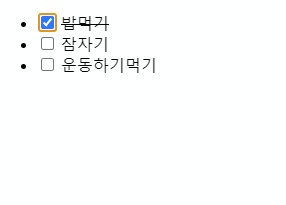
[javascript] 체크박스 클릭하면 오른쪽 텍스트에 line-through 적용.
●▲■ PRINT
2023. 5. 28. 00:55
<!DOCTYPE html>
<html lang="en">
<head>
  <meta charset="UTF-8">
  <meta http-equiv="X-UA-Compatible" content="IE=edge">
  <meta name="viewport" content="width=device-width, initial-scale=1.0">
  <title>Document</title>
</head>
<body>
  <article id="mission">
    <ul>
      <li>
        <input type="checkbox">
        <span>밥먹기</span>
      </li>
      <li>
        <input type="checkbox">
        <span>잠자기</span>
      </li>
      <li>
        <input type="checkbox">
        <span>운동하기먹기</span>
      </li>
    </ul>
  </article>
  <script>
    let input = document.querySelectorAll('input');
    let span = document.querySelectorAll('span');

    for (let i=0; i<input.length; i++) {
      input[i].addEventListener('change', function() {
        if(this.checked) {
          span[i].style.textDecorationLine = "line-through";
        } else {
          span[i].style.textDecorationLine = "none";
        }
      })
    }
  </script>
</body>
</html>
See the Pen 체크박스 클릭하면 오른쪽 텍스트에 line-through 적용. by Lee sangmin (@sangmin2) on CodePen.